How your phone can help create cool home interior looks

The entire toolkit you need could be right there at your fingertips
Finding the right colour for your walls should always aim for a physical test with real paint. Still using augmented reality (AI) apps of your phone can give hone the palette with ease. Dulux, Colour of the Year 2022, Bright Skies.

Finding the right colour for your walls should always aim for a physical test with real paint. Still using augmented reality (AI) apps of your phone can give hone the palette with ease. Dulux, Colour of the Year 2022, Bright Skies.

There is a range of tools and apps on your smartphone that could transform your hunt for décor, design, accessorising, and even fill a basket with local organic produce from your bed on Sunday morning. 

Visual searches and augmented reality, much of it downloaded for free, can perform practical tasks. Identify that fungus on the plant you just bought or swoop a swatch of paint across every wall before you spring for a tester pot.

COLOUR ME HAPPY

There are a number of paint selectors which utilise augmented reality to visualise a colour in your actual space.

Dulux Visualiser downloaded to an IOS phone, lets you “see” the colour on your wall. You can even choose a colour from say your favourite sofa and then ask the app to display a suitable colour to complement it. Your phone will require on-board movement sensors if you want to float the colour wall to wall in real time, otherwise simply use a static image and apply. 

Any of these apps take a bit of practise. IOS only at present. Download for free, apps.apple.com.

MyRoomPainter from Crown is available for IOS and Android devices, but uses only static images. It includes a colour-matching function, a handy paint calculator, a library of images for inspiration, and a share facility to see if your Mum likes ‘Mustard Jar’ too. 

Download free from Google Play, Apple, or Amazon.

POCKET TOOLKIT

Genius for measuring twice and cutting once if you have an Apple device, iHappy Carpenter is a five-piece carpenter’s toolkit, ideal for DIY and decorating jobs. It includes a plumb bob to verify the verticality of lines or walls; a surface level; a bubble level bar that’s a bit mesmerising, I have to say (desk toy alert); a steel protractor, measuring angles from 0 to 180 degrees, and a steel ruler, supporting both inches and centimetres. 
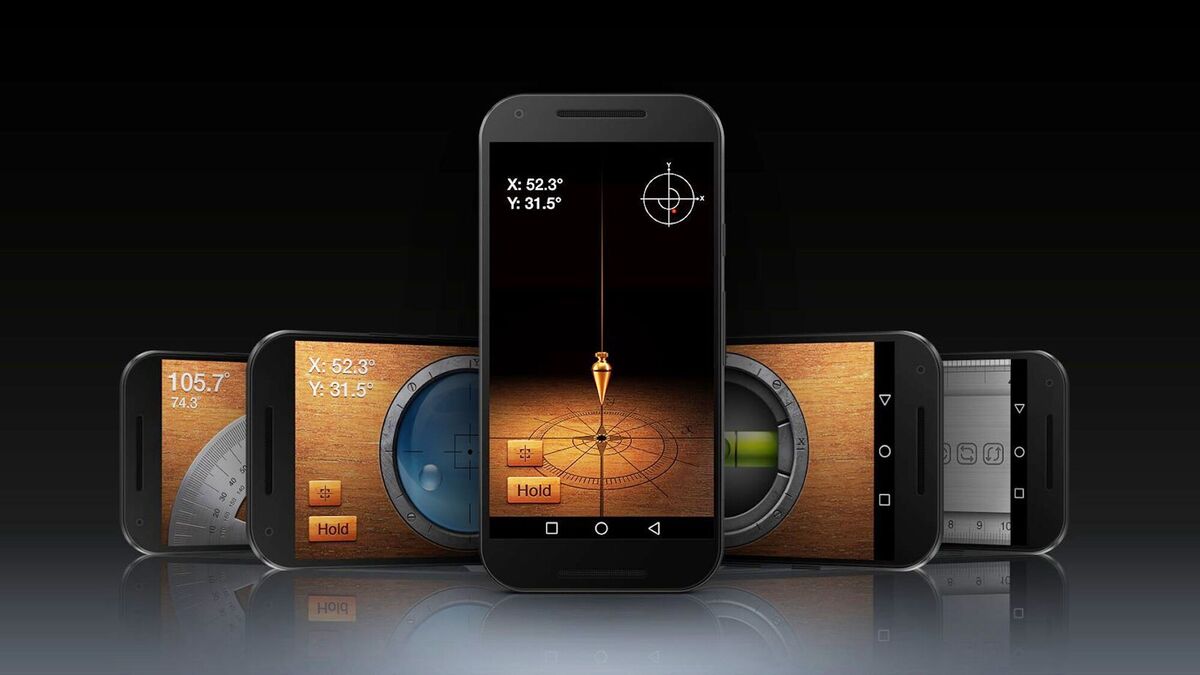
iHappy Carpenter: Five free DIY tools for measuring and levelling right there on your phone. iPhones only, free from the Apple Store.

By swiping it left and right, the ruler is capable of measuring things longer than your iPhone. Once calibrated, the plumb bob, surface level, and level bar can also be used as an inclinometer/clinometer (slope). 

Free from the Apple Store. Some recent phones like the Galaxy S20 have level devices in the camera features. Take a look for bubble gauges and other helpers you may have filed away.

PLANT FINDER

If you see a plant, tree or shrub in someone’s home, at a park, in a wood, or garden have you ever wondered what it is? Plant finder (from Picture This) is a brilliant AI visual search tool that can instantly ID over 10,000 species, allowing you to find the Latin name that will lead back to an order at the garden centre. 

Over 70m users have already downloaded this little gem worldwide. The finder includes a growing guide and a care and disease facility. Imperfections on your plants are picked up by image and analysed, with treatments offered.

The Add to my Garden feature will allow you to set reminders for watering and fertilising. There is a toxic plant guide too, perfect for ensuring your children and pets are not put in danger by a tropical species with say poisonous berries.

Be wary of using any on-board search app for identifying wild fungus for the plate, lethal mistakes still take place. If you have trouble finding a plant, change the angle or distance of the photograph to offer new detail.

€2.99 to €54.99 depending on the package for Android and IOS. Totally free? Try PlantNet, plantnet.org, or for flowers you don’t even have a shot of What’s That Flower, play.google.com.

DESIGN OF THE TIMES

Interested in exploring 3D design software beyond the bald drop-and-drag planners? Useful for working out rooms or a single piece of furniture, try the free introduction from Sketch Up, with 10GB of cloud storage (sketchup.com) or Planner 5D, with over 6,000 decorative elements, infinite floor-plans and outdoor and indoor design capabilities (planner5d.com). 

Look for 3D modes that allow you to move the design around in space, and snap-shot to ensure you have a record of your ideas, useful to take to an interior designer and/or architect.

Move your physical decorating mood-board up onto your PC, with phone shots or by utilising a mood-board from Instagram or Pinterest to organise your album of ideas. Sub-categorise them into colour, furnishings, materials etc. Extremely handy on the move.

Don’t completely trust colours. Rendered on your device they may be quite different depending on the platform, screen, and resolutions. If you know the outlet you’re buying your suite/bathroom/kitchen/integrated storage from — check out any easy CAD facility on their website flying their products into position. B&Q for example have used these customers tools for over a decade.

GOOGLE IMAGE

Free, easy, and often over-looked for visual searching, Google Image Search, including Google Lens, is a fantastic tool for escaping static catalogues and looking up furniture, textiles, room-sets, styles, and even identifying odd collectables on the spot. It’s not perfect, but for visually similar images, it regularly surprises this analogue girl.

I’ve sourced the plate brand and range I’m eating off at a café in half a minute. Just take a shot of the thing with as little clutter in the background as possible (the line, over-all shape and colour will be important) Upload it as a Google Image Search from your albums, or use a pasted URL or web address leading to an image from the web.

Try it out on everything from seating to china patterns, wallpaper designs, and boot sale finds (before you buy!). To search for detail within the image, train the Google Lens represented by a magnifying glass on the area of your chosen image. The results it collects can be further refined by typing say ‘sofa Ireland’ into the space bar to drill down on host sites and local suppliers with similar objects and products, imagesgoogle.com.

MURAL MAGIC

If you have a picture of more than about 300dpi resolution (the bigger the better for reproducing essential detail), you can create your own wall design with your phone camera and/or your PC. Borrow a DSLR if your phone camera is useless with a small MB capability. 

A 3m wall demands 3000 pixels – over 20mb to deliver vivid detail from a reasonable distance. The image could be something from an online search, a family shot or something arty you photographed, for instance a collage of toffee-coloured autumn leaves on a walk — whatever. 

Murals from illustrations, art, childrenís work and your own photographs can deliver fabulous murals. Explore the supplier in house collections in your travels. Koi II Mural by Spacefrog for wallsauce.com. 

Once uploaded, the host site will tell you if the shot is of sufficient quality in a Jpeg, Tiff, or PNG, and then will prompt you to give the dimensions of the space, and to choose a finish. There will be a dummy picture with, say, a sofa in the foreground to mock up the results, which will show any joins where the rolls of the mural meet. 

A preview will allow you to move the image to lessen the impact of those vertical join lines.

Prices from €40/sq m plus delivery. 

Note: Most colour guarantees depend on situating the piece out of direct sunlight. Try wallsauce.com and bagsoflove.ie for instructions and an estimate for the project.

FRESH FOOD

Your local food suppliers are closer than you think and with a few taps you can find not only the best farmers’ markets in your area, but the producers who supply them. The mission of neighbourfood.ie, is to “bring the best produce to your table, support our incredible local food producers and build a community around delicious food.”


All you have to do is find your local market on the market page and choose from a wide range of local produce including fruit and veg, bread, pastries, cheese, meats, beers and much more.

When you’ve filled your basket, complete your purchase. Your goodies will be supplied to you at a local venue. The sale of any large-scale commercially grown vegetables, non-organic imported fruit or vegetables, genetically modified products, intensively reared meat, imported fish or battery eggs is not permitted on the site.

x

More in this section

Revoiced

Newsletter

Had a busy week? Sign up for some of the best reads from the week gone by. Selected just for you.

Cookie Policy Privacy Policy Brand Safety FAQ Help Contact Us Terms and Conditions

© Examiner Echo Group Limited