Epomaker Galaxy 100 Lite review: A compact full-size mechanical keyboard for work and gaming
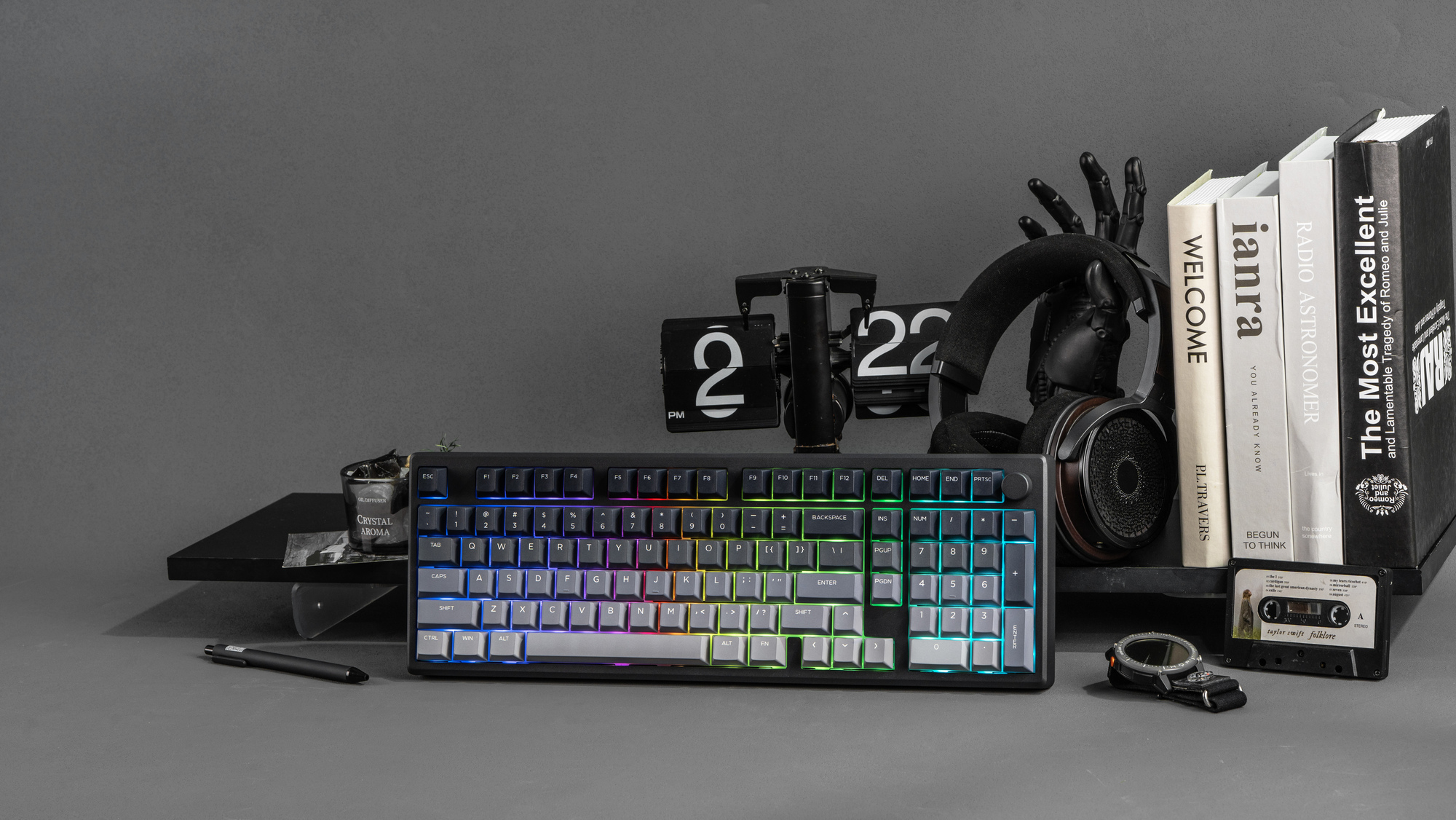
The Epomaker Galaxy 100 Lite features a compact 1800 layout that keeps the numpad while saving desk space. Picture: Epomaker.
Mechanical keyboards continue to grow in popularity as more gamers and everyday users seek a better typing feel, longer lifespan, and greater customisation than standard membrane keyboards can offer.


The Galaxy 100 Lite is noticeably heavy, thanks to its aluminium case, and that weight keeps it planted on the desk during long typing or gaming sessions. There is very little flex anywhere, even if you press down hard in the centre, which gives it a reassuringly solid feel.
The 1800 layout gives you a full numpad and proper navigation keys, but in a footprint that is smaller than a traditional full-size board. After a couple of days, I found it easy to adjust, and it freed up some desk space without sacrificing functionality. The only downside is that it is ANSI only, which may put off users who strongly prefer ISO layouts.

Keycaps are Cherry profile PBT with dye-sublimated legends. They feel thick and textured, and after weeks of use, there is no sign of shine. The legends remain clear, even with RGB on. The metal rotary knob sits neatly in the top right and feels sturdy. I mainly used it for volume control, and it worked reliably without wobble.
One thing worth noting is the lack of adjustable feet. The typing angle is fixed, and while I personally found it comfortable, users who like a steeper angle may need a wrist rest.

The Galaxy 100 Lite offers tri-mode connectivity, with USB-C wired, 2.4GHz wireless and Bluetooth. Switching between modes is simple using shortcuts, and I had no issues pairing it with both a Windows PC and a Mac. The 2.4GHz mode is the one I used most, as it balances convenience with low latency.
Battery life is excellent. The 8000mAh battery is rated for up to 39 hours with RGB enabled, and 512 hours with lighting turned off. Charging via USB-C is quick, and you can continue using the keyboard while it charges.

VIA and QMK support is a big plus for anyone who likes to dive deep into customising lighting, macros, and key layouts. That said, I found the initial setup a bit frustrating, and it’s definitely not as plug-and-play as some of the mainstream brands. It requires reading the manual and following a few specific steps before the keyboard is properly recognised. Once everything is loaded and the VIA software detects the keyboard, remapping keys, creating layers, and setting macros are all straightforward, as long as the layout file is installed.
The keyboard is also hot-swappable, making it simple to experiment with different switches, even for users new to custom keyboards. South-facing RGB avoids interference with Cherry profile keycaps and offers plenty of brightness options without being overpowering. The RGB quality is excellent, and the effects look great, but there is no option to customise the lighting or colour on a per-key basis.

The gasket mount and multiple layers of sound-dampening create a soft, cushioned feel that reduces finger fatigue during long writing sessions. The linear switches in my unit were smooth and consistent, with no scratchiness and very little rattle from the stabilisers.
Sound is muted rather than loud or sharp, but it does make a click-clack sound that will annoy those sitting near you in shared spaces.
Compared to other aluminium keyboards I have used, it feels calmer and less hollow. For gaming, wired and 2.4GHz modes felt responsive, even in faster shooters, but I’m not a competitive gamer, and your mileage may vary. Bluetooth was fine for general use, but showed noticeable delay in games, which is expected.
A solid, well-built keyboard with a comfortable layout, strong battery life and pleasing typing feel. It suits work and gaming equally well, though the fixed typing angle and Bluetooth latency may limit its appeal for some users.
€94 Epomaker