The Huawei MateView — a stunning 4K + display with a gorgeous design
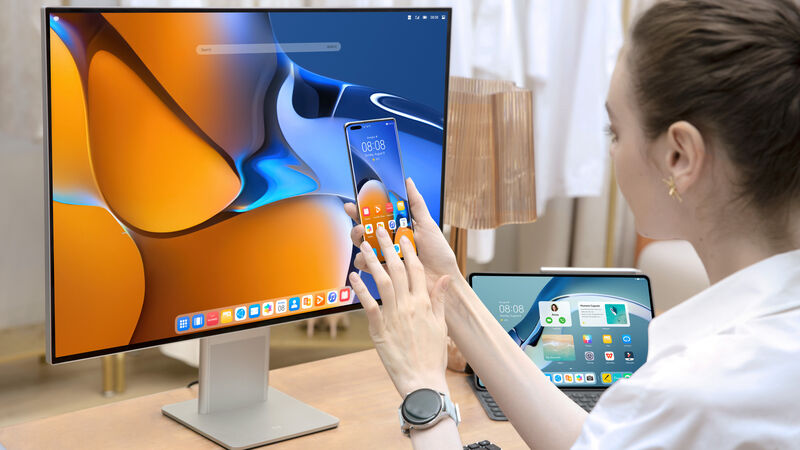
Huawei MateView 4K+ IPS monitor. Pic: Huawei.
One of the most important devices we all use every day is our screens, whether it be on our phones, tablets, or computers. Monitors come in all sorts of shapes, sizes, aspect ratios and prices and this can make it difficult to choose the best display for your purposes or needs.
I’ve been checking out the new Huawei MateView 28 for the last few weeks to see if it’s something you should consider as your next monitor purchase.
I have used a ton of monitors over the years and for all sorts of applications. Choosing a monitor is often down to price but this shouldn’t be the number one priority. You have to factor in the fact that a good monitor is an investment and will last for your years.

One of the more distinctive features of the MateView is its 3:2 aspect ratio which means it’s a little taller than most widescreen monitors. This makes it great for most office-type applications but gamers and potentially, creative professionals may not enjoy it as much as a wider screen.
I remember when all monitors were 3:2 and then in the early 90s, 16:9 started to become popular. Back then we were told that 16:9 was better for productivity. Personally, I think 3:2 looks bigger and in general, is better for most productivity tasks with a few exceptions. However, the now more typical widescreen aspect ratio is far better for watching video and gaming as well as creative apps that have a lot of palettes and windows. A good example of this would be the Adobe Creative Cloud Suite or many video or sound editing applications.
The MateView features a stunning design with a thin metal frame, a tall stand and a flat metal base. Around the back are some neat chrome accents and a large Huawei logo. This monitor would look great on any desk either hooked up to a PC or even one of the latest Apple MacBook or Huawei MateBook.

The monitor has a decent amount of height and tilt adjustments but unfortunately, there’s no swivel. This means you can’t put the monitor into portrait mode if that’s a requirement for what you do.
There are two speakers built into the stand and although they’re not good enough to replace a decent set of desktop speakers, they’re better than most PC monitor speakers. There are also dual microphones. These are welcome additions and clever design choices.
The MateView doesn’t have any VESA mount on the back to attach the bare monitor to an adjustable desk stand or wall mount. In many ways, this is a case of form over function and the MateView is one of the best-looking monitors I’ve seen or used but at the expense of functionality. However, the lack of a VESA mount is understandable when you take into account the stand which contains all of the monitors hardware, including ports and speakers.

The MateView has a diagonal screen size of 28.2-inches with a native resolution of 3840 x 2560px which is ideal for maximising the amount of information you can fit on your screen. Most 4K screens have a more typical resolution of 3840 x 2160px which means the MateView has a higher pixel count with a PPI (Pixels Per Inch) of 163.
The extra pixels are great for clarity and productivity but also makes it more difficult to drive games but since the MateView is locked at 60hz and with a 4ms response time, it doesn’t lend itself to high-end PC gaming. To be fair, you can reduce the resolution for gaming but I still wouldn’t go back to gaming on a monitor with 60Hz when I’m used to a much faster refresh rate monitor.
The MateView is HDR 400 certified and is a 10-bit IPS panel (8-bit with dithering). Unlike TN, VA or OLED panels, contrast isn’t especially great at 1200:1 typical while still being above average for an IPS display.

To test contrast and colour accuracy I used the Spyder colour calibration tool. At 100% brightness, I measured contrast at 870:1 and 30140:1 at 0% brightness. While the display is rated for a maximum brightness of 500 nits, I recorded 524.5 nits but this was in the centre of the screen. I recorded dips in this peak brightness on the edges down to 442.8 nits in the top right of the screen. In most situations, this isn’t a problem but for those who need a monitor for high-end colour work, it should be better.

The MateView is claimed to have 100% coverage of the sRGB colour space and that’s exactly what my calibration results recorded. This is the colour space used by web designers and others that need accurate colour when designing for screens.
The AdobeRGB colour space is what most pro photographers and designers will use for print and here I was able to achieve 87% of the AdobeRGB colour space which is pretty accurate.
My DCI-P3 colour results were well short of the claimed 98% claimed by the specs but are still pretty good at 92%. This is the colour space used by video editors and a result of over 90% is excellent unless you’re a pro who does high-end colour critical video editing.
To be fair, while these colour results are a little below Huawei’s specs, my review unit is a loaner and there will be variances between panels.
The MateView uses a touch strip under the bottom edge of the screen for the on-screen control software. It works well enough but it was a little finicky when trying to dial in things like the exact brightness I needed during my testing. When trying to change the brightness to say 50% it would jump between 48% and 52%. Overall though, it is intuitive to use and has an easy to read overlay.
Using the OSD you can change the speaker volume, brightness, select input and toggle between the three different display modes: DCI-P3 and sRGB and Native colour modes.

The MateView supports the latest wifi 6 and Bluetooth 5.1 connectivity, and if you have a Huawei smartphone, you can use NFC wireless projection to mirror the screen on the display. You can use a Bluetooth keyboard and mouse to manage your PC or laptop, and you can utilise HarmonyOS to link multiple Huawei devices together. However, when I tried this with a Huawei P40 Pro it said my current software does not support using OneHop with this device so I wasn’t able to test the feature.
Around the back of the stand, you’ll find a HDMI 2.0 port, a mini-DisplayPort 1.2 and a USB-C port which is used to power the display. On the right edge of the stand are two USB ports, a USB-C port and a 3.5mm headphone jack.
The Huawei MateView is a stylish monitor that’s beautifully crafted with premium materials and a stunning design. While hardcore gamers will want to look elsewhere, those requiring a 4K monitor with excellent colour accuracy for web, print and video won’t be disappointed. If you’re looking for a stunning looking monitor for your killer desk setup then the MateView is a great option but for general office work, the MateView is overkill since there are so many good and cheaper alternatives available.