HP Omen 15 is top gear for fast gaming
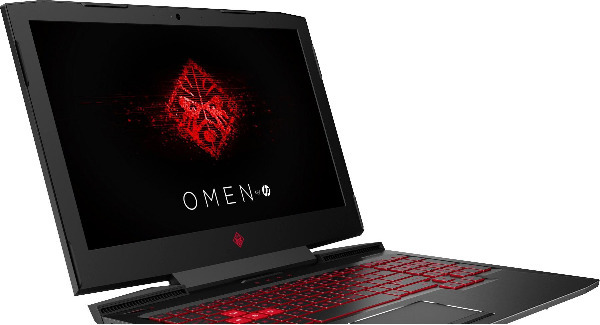
says gamers will enjoy HP Omen 15’s faster CPU and graphics card, plus all the usual laptop uses.
There are many reasons to choose a gaming laptop over a traditional one — even if you’re not a heavy gamer.
I fall into the category of casual gamer, but also use my PC for video editing, photo editing and a variety of other general PC computing tasks.
This broad range of uses means I can take advantage of a fast CPU and graphics card, something you generally only get in a gaming PC, although there are exceptions to this in the likes of the Dell XPS range and an increasing number of other models offering dedicated graphics.
The latter generally come with a smaller form factor but a hefty price tag.
In general, a lot of gaming laptops are big and heavy and although I require something to be portable, I don’t need an ultrabook.
RAM is important for video editing and applications like PhotoShop/Lightroom, so a minimum of 16GB is essential and a fast SSD is crucial for speeding up almost all Windo ws operations and fast load times.
The display brightness and colour accuracy are also important to me, but I use an external display for more colour critical work anyway.
After weighing up all the pros and cons and doing my due diligence to find the right laptop for my requirements, I settled on the HP Omen 15.
The particular specs of the model I choose came with excellent gaming hardware including a Ge-Force GTX 1060 with 6GB of GDDR5 VRAM, a nonreflective, 120Hz refresh, Full HD display with GSync, and an Intel Kaby-Lake Core i7-7700HQ CPU.
Other specs include 16GB of RAM, 256GB SSD and a 1TB HDD (7,200 RPM).
Stunning good looks
The HP Omen 15 really is a stunning looking laptop, but there’s no disguising the fact that this is squarely aimed at gamers.
The WASD keys are red with white backlighting and the rest of the key-board is backlit with a vibrant red.
You can turn off the backlighting or just have the WASD keys lighting — making it near impossible to see the lettering on the rest of the keys thanks to black keys and dark red letters.
Or, have everything lit up including the actual letters, numbers and symbols, which looks pretty cool.
The lid has a substantial central hinge that’s sturdy and allows for opening the lid with one hand.
The power button is located on the top right of the keyboard and is also lit up in red and is easy to access and turn on.
On the top of the screen is the Windows Hello enabled cameras, which make logging into the laptop a pleasure because you don’t have to actually do anything, other than look at the cameras.
The top/cover of the lid is an unusual design that combines textured plastic with carbon fiber, forming an X with simple red lines in the middle.
Here you’ll also find the distinctive HP Omen monkey logo.
The base of the laptop features substantial rubber feet that make it feel secure, even on a polished table.
Here, you’ll also find the air vents for the fans that do a pretty good job of dispersing the heat. This isn’t so ideal for those who like to sit their laptops well, on their laps.
The overall build quality feels great and I don’t have any major worries about robustness. This can be a concern if you’re someone who lugs a laptop around a lot.
The overall weight of the Omen 15 is substantial at 2.6kg, not including the massive 1030g power brick that powers everything.
In terms of ports, the Omen 15 has a comprehensive selection.
My configuration came with three USB-3.0 Type-A ports, a Type-C port/USB 3.1 Gen2, Display Port, and even Thunderbolt 3.
It has two audio ports (headphones + microphone), a fold-out RJ45 port, and an opening for Kensington Locks and an SD card reader.
I love the keyboard on this laptop as it has just the right amount of travel for fast typing, the keys aren’t too loud but the function keys are difficult to read when the backlighting is off.
The trackpad works well and does have a physical left and right mouse button, but mostly I use my own dedicated mouse — especially for gaming.
The sound system in the Omen 15, as with all HP laptops, is tweaked by Bang & Olufsen.
Overall sound quality is decent with good mids but slightly tinny highs. For gaming, and movie watching, the soundstage is impressively wide.
This is in part thanks to the fact that the left and right speakers are located on the bottom front and fire outwards, left and right.
The lack of any subwoofer means the sound lacks good bass but overall volume is more than adequate.
As a gaming machine, the Omen 15 is a stellar performer as long as don’t intend to use it hooked up to a 4K screen and run games at that resolution.
The GTX 1060 Max Q is more than capable of delivering excellent Full HD gaming.
For those who want to maximise their gaming experience, the 120Hz display is astounding — buttery smooth and all games feel like there’s less lag.
Of course, to get the most from the display you need to get close to 120 fps. in games like Fortnite, I didn’t have any problems in achieving this with some tweaking.
The screen looks great and although not super bright, it’s more than bright enough for indoor use. Viewing angles are also good and colour accuracy is decent.
One area the HP Omen 16 really sucks is in battery life. This is down to the fact that it uses G-Sync technology.
This means it can’t switch to the low-powered, onboard graphics like non-G-Sync laptops.
In general use, with all the power savings turned on, you’d be lucky to get four hours from the battery. In general, I got around two hours of general use.
I ran a lot of benchmarking software on the Omen 15 and the results were good but more importantly, I’ve been incredibly impressed with the user experience and overall performance.
All of the tasks that seemed like heavy lifting on my old laptop is now accomplished with ease. It’s hard not to recommend this for power users and gamers alike despite some compromises in battery life.