The Samsung Galaxy Book2 Pro — ultra-thin and ultra-portable
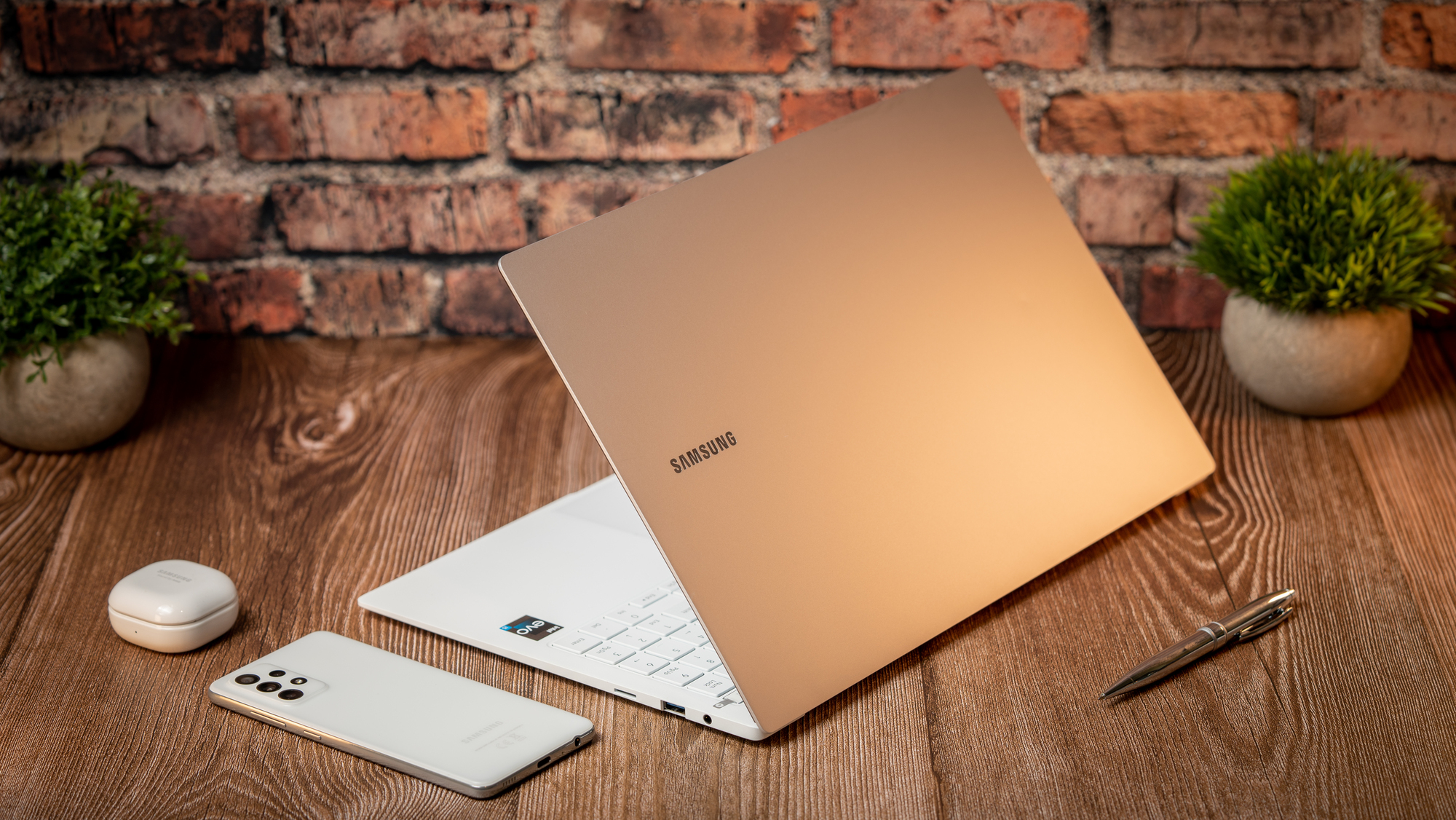
Samsung Galaxy Book Pro 2. Picture: Noel Campion.
The Galaxy Book2 Pro is one of the more unusual laptops I’ve tested this year and not only because it features an OLED display but because of how light it is at 1.1kg. At just 11.7 mm thin, it’s slimmer than some smartphones and certainly one of the thinnest and lightest laptops around.

The Galaxy Book2 Pro is lightweight and super thin but still manages to fit Intel’s latest 12th-Gen Core processors and my loan unit came with 8GB of RAM and 256GB of upgradable M2 SSD storage. The fingerprint reader is located at the top right of the keyboard and supports Windows Hello login and doubles as the power button.

It comes pre-installed with Windows 11 Home, which is always good to see in a new laptop. If you have a compatible Samsung smartphone, tablet or audio device, you’ll be able to take advantage of a number of pre-installed apps for a full Samsung ecosystem experience. If you don’t, you’ll have to spend a little time uninstalling these apps.

My unit was the 15.6-inch OLED variant, which is small and incredibly portable — even more so than my iPad Pro 12.9 with Magic Keyboard. The screen is really thin and there’s a lot of flex but the hardware is designed to take this. The body also has some flex which I’m less confident about. The MacBook Air, for example, feels far more solid by comparison with no flexing, although it is much heavier.

The Galaxy Book2 Pro has a good selection of ports including HDMI, Thunderbolt 4/USB-C (x1), USB-C (x1) on the left side and USB 3.2 (x1), a microSD card reader and a headphone/mic combo jack on the right. I was surprised but impressed to see a Thunderbolt 4 port since it isn’t standard on many PC laptops. There’s no dedicated charging port so you’ll need to sacrifice one of the USB-C ports when you need to plug the laptop in.

The 15.6-inch Full HD AMOLED display is stunning. It features minimal bezels on the sides with a 16:9 aspect ratio that leaves a sizable bezel on the bottom. The top bezel is a little larger than the sides and houses a 1080p webcam in the middle.
The screen is glossy and comes with an anti-glare coating that cuts down on reflections. I measured a peak brightness of 571 nits in my HDR brightness test and 389 nits peak in SDR which is good enough to be able to use the laptop outside but not in direct sunlight.

Being an OLED screen, the contrast is infinite and the colour is incredibly accurate. I measured 100% of the sRGB, 98% of Adobe RGB and 100% of the P3 colour space. These are impressive numbers for any display and make it one of the best screens I’ve tested for those who do professional colour work.
While the display doesn’t support touch, I was able to use my Galaxy Tab S7+ as a secondary display with S Pen support using Samsung’s Second Screen app. This works similarly to Sidecar for MacOS and works just as well.

The display is also HDR10 compatible and movies that use the format look stunning. However, while the display would also be great for games, the refresh rate is locked at 60Hz and the integrated Intel Iris Xe graphics are not up to playing any of the latest graphics-intensive games.
The stereo bottom firing speakers support Dolby Atmos and the quality is okay but lacks any real bass or loudness which isn’t surprising given how thin the body is.
The latest Wi-Fi 6E is onboard along with Bluetooth 5.1.

It’s great to see an off-white full-sized keyboard, which has black characters and white backlighting. The keys are well spaced and I found the typing experience good although I would have preferred a little more travel and slightly more tactile feedback.
The touchpad is massive and slightly offset to the left side. It fully supports Windows 11 gestures and has a positive physical click.

My review unit came with the Intel Core i5 1240p and performance is excellent for general office tasks. Sustaining loads can be an issue and thermal throttling is a guarantee. The base gets toasty, even with the fans at full speed and the performance will take a hit.
I used a cooler pad with two large fans to help keep the laptop temps down and it did help performance for long sessions while editing photos in Lightroom.

The internal 256GB SSD performance was average with a write speed of 1126MB/s and read speeds of 2241MB/s on average using the BlackMagic disk speed test.
Battery performance is excellent but how long you can get from a single charge ranges vastly depending on CPU/GPU loads and screen brightness. The 65W charger is a USB-C brick and takes less than two hours to fully charge the laptop.
The Samsung Galaxy Book2 Pro is an interesting laptop with a lot of high-end features like an OLED screen that suggests it should retail for a higher price. It is super light and portable but I’d be careful not to abuse it. I love the design and the performance is excellent for the most part — there’s just no escaping thermal throttling in an ultrathin body.
The Galaxy Book2 Pro has a stunning display and a great array of ports and comes in at a price that seems fair and if you’re looking for something even smaller and lighter, there’s also a 13.3-inch variant that weighs a mere 870g.
Samsung Galaxy Book2 Pro €1,299 Samsung


CONNECT WITH US TODAY



Be the first to know the latest news and updates